When you open Bonder in the morning, within ten seconds you’ll know exactly where you stand. Which customer has been waiting for your reply since last night. Which task is due today. Whether your team has the backlog under control. You don’t have to open a single list to find this out. That’s exactly what the new Bonder dashboard does: it’s a personalized home page that shows you every morning what’s really going on.
Does this sound like how you start your day? First, you go through the ticket list, then your tasks, check the time tracking system briefly, glance at your notifications here and there, and eventually take a look at the outstanding invoices. Half an hour later, you might have a rough idea of where things stand—but you haven’t actually completed a single task.
With the Bonder Dashboard, your day starts differently. You open Bonder, and everything you need is already there: clearly organized, up-to-date, and tailored exactly to your needs. You no longer have to search for anything and can get started right away.
Your Day at a Glance: Four Questions, Answered Right Away
Almost every workday begins with the same four questions. What’s on the agenda today, and where are the urgent issues? Is everything going according to plan, and what’s new that happened while you were away? Until now, you’ve had to piece together the answers from various lists. Now they’re right there on your home page as soon as you open Bonder .
What's on the agenda today?
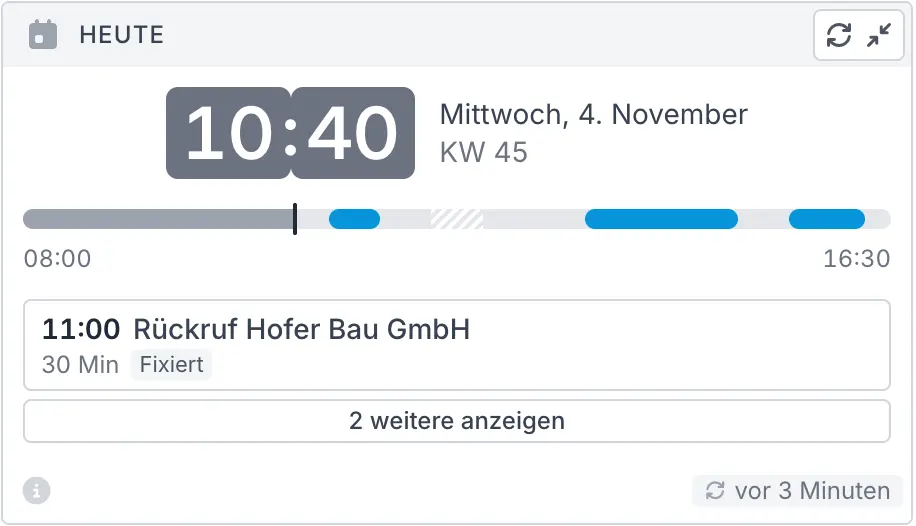
Before you dive into your first request, it’s worth taking a moment to get your bearings. How long is your workday today, when is your break, which tasks are scheduled for specific times, and how much time do you actually have left for work in between? The dashboard shows you the day as a clear timeline, along with the next task waiting for you. You’ll know right away where to start, instead of having to spend a long time figuring it out.
What's on fire?
In day-to-day customer service, not everything is equally urgent. The key is to identify the few things that can’t be put off: the task that was due yesterday, the customer who’s been waiting for your response since last night, the ticket that’s been open for weeks. The dashboard brings exactly these items to the forefront and highlights them in color . You can address the important issues before they turn into an upset customer or an escalation.
WidgetsTasksMy Tickets at a GlanceMy NotificationsTicket AgeOldest Open Tickets
How's it going?
You often have a sense of whether things are going well. With the dashboard, you have certainty. You can see whether your team has reduced the ticket backlog this week or whether it has grown, and whether your own hours are on track or if there’s still some work left over from the previous day. You also have a clear view of your finances: how much money is still outstanding from open invoices and which amounts are already past due. This allows you to take corrective action in a timely manner, rather than being caught off guard at the end of the month.
WidgetsTicketsTicket HistoryMy Time EntriesOutstanding Invoices
What's new?
Announcements to all employees, the date of the next training session, a new feature in Bonder: Information like this can easily get lost in overflowing inboxes. Using the dashboard, you can deliver it directly to your employees—right where everyone looks first thing in the morning anyway. Your entire team stays on the same page without anyone having to read a group email.
WidgetsNews
11 Widgets at a Glance
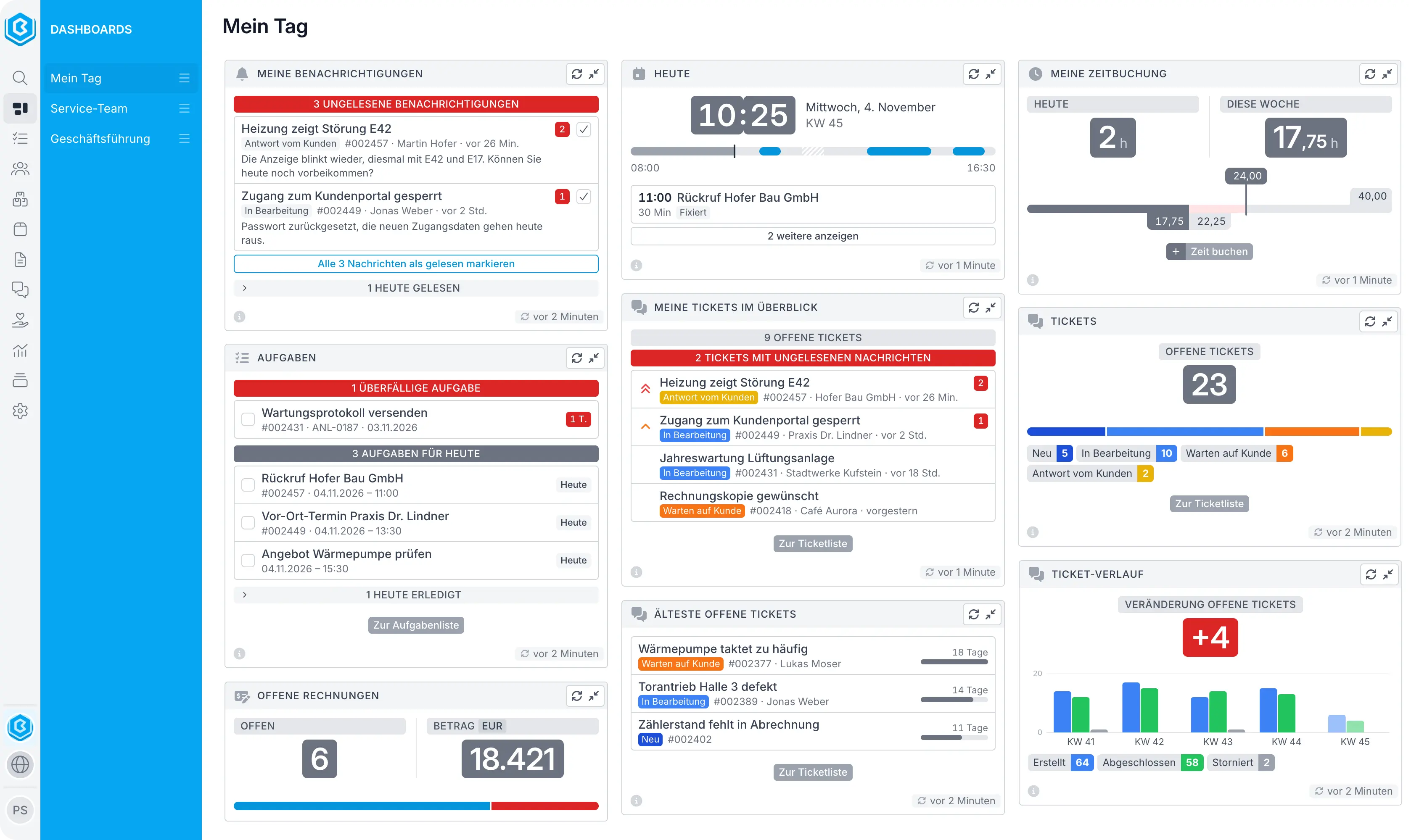
At the heart of the dashboard are the widgets. Each one answers a question you ask yourself every day on the job. As you read , you'll probably recognize yourself in one situation or another right away.
Time
Today – Your Guide to the Workday
Open Bonder and you’ll know right away what your day looks like: how much work time you have left, when your break is, and what’s next on your list. No searching, no wondering where to start. Your day has a clear direction before it’s even really begun. And if something gets left undone by the end of the day, you’ll notice it that very same day.
My Time Tracking – No more piecing together hours
The end of the month is approaching—and with it, the tedious search for forgotten hours? That’s a thing of the past. This widget lets you know every day, almost as an afterthought, whether your time tracking is complete—while you still remember what you were working on. One click, and the missing hour is added. No guilty conscience, no piecing things together, no follow-up questions at the end of the month.
Tasks
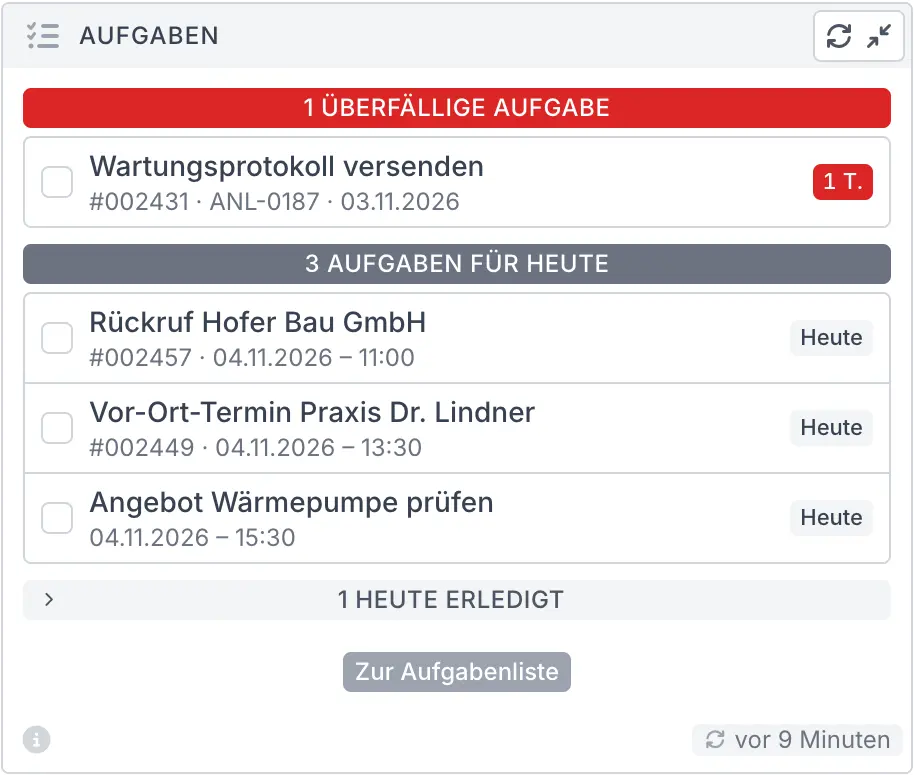
Tasks – Your to-do list, neatly organized
Finally, a to-do list that thinks for itself: Urgent tasks are at the top, and things that can wait are left for later. When you finish a task, just check it off right away and watch the list get shorter. By the end of the day, you’ll know exactly what you’ve accomplished. It’s a great feeling that motivates you every single day.
Support
My Tickets at a Glance – Know who’s waiting for you
Imagine knowing right away—the moment you open your eyes in the morning—which customers have reached out and what their issues are. That’s exactly what this widget does: New items appear at the top, and urgent cases stand out immediately. With the “ Bonder ” AI, you can see in a single line what each ticket is about or what needs to be done next. This lets you respond faster, and your customers will notice the difference.
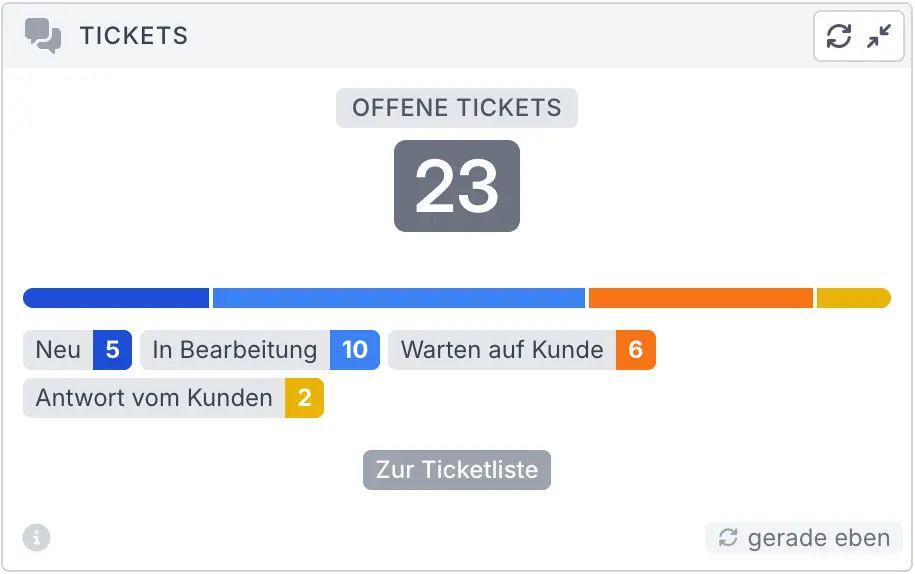
Tickets – The One Number That Matters
Sometimes you don't need a list—just a single number. How many items are currently on the table? How many messages are still unread? Are there more requests coming in this month than last month? This widget gives you the answer, large and clear, for your entire team or just for you. If you want to see both, simply add it twice to your dashboard.
Ticket Age – The Early Warning System for Your Service
A pending issue that goes unresolved frustrates customers more than almost anything else. This widget is your early warning system: With just a few numbers, it tells you how long your open tickets have been pending on average and how many of them have been open longer than you consider acceptable. Six out of ten tickets older than five days? You’ll notice this number long before the first complaint comes in. That way, you’ll know in time that you need to take action. If desired, the widget also counts from the last response and tells you how many tickets haven’t been touched in days. The “Oldest Open Tickets” widget shows you exactly which tickets these are.
Oldest Open Tickets – Know where to clean up
Every team is familiar with them: the tickets that have gotten stuck somewhere and that no one thinks about anymore. This widget brings them to light—the oldest ones first—and shows who’s handling them . An hour of cleanup, and the list gets noticeably shorter. For your team, that’s a success; for your customers, it’s a relief.
Ticket History – Are we catching up?
Are we keeping up or not? Every team leader asks this question, and this widget answers it at a glance. It shows whether your team is resolving more tickets than are coming in, or whether there’s a backlog. Instead of compiling numbers for the team meeting, just take a look at the dashboard and you’ll know where you stand. And when the backlog shrinks, the whole team can see what they’ve accomplished together.
Communication
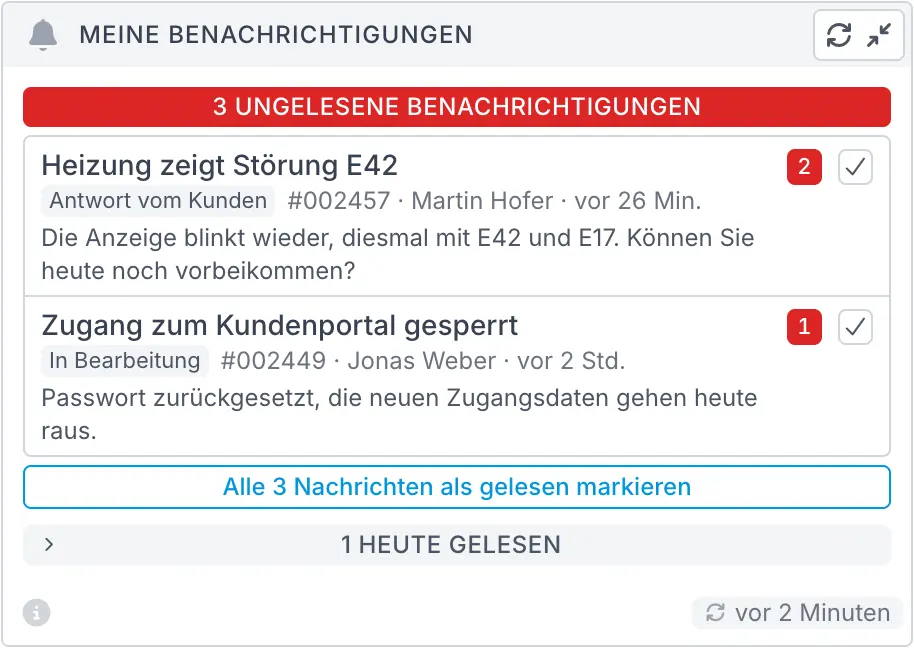
My Notifications – An inbox you can clear out
Have a few things piled up overnight? No need to worry. The widget groups related items together and gives you a quick preview of what’s involved. Check off what’s done—all at once, if you’d like. In just a few minutes, you’ll be up to speed and free to focus on the work at hand.
News – Information That Gets Through
How many group emails actually get read at your company? With this widget, your dashboard becomes your internal communication channel: You can send announcements, training dates, and feedback surveys directly to your employees, and they’ll appear right where everyone looks first thing in the morning. And if you’d like, you can find out right away what’s new at Bonder . Your team stays informed without anyone having to go looking for the information.
Billing
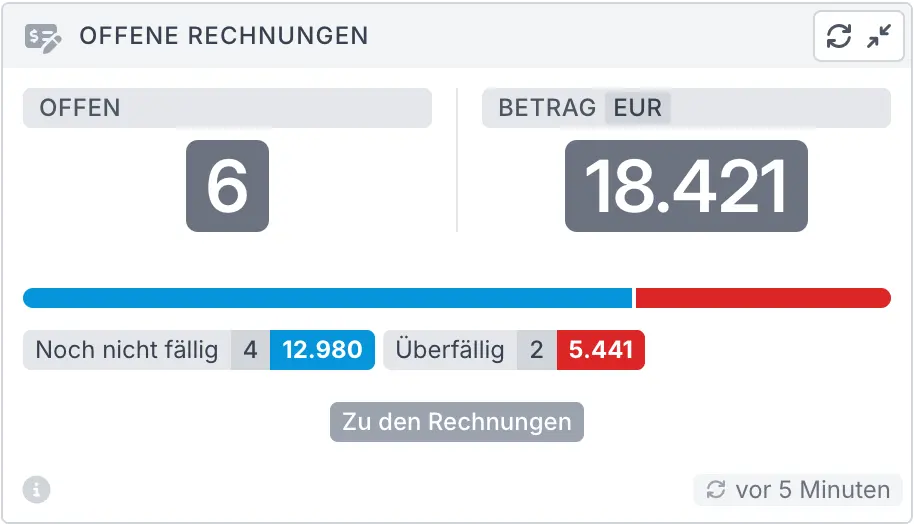
Outstanding Invoices – Keep Track of Your Money
How much money is still outstanding, and where should you follow up? This widget answers both questions at a glance: You can see the outstanding amount and immediately identify which portion is already past due. No Excel exports, no analysis, no searching. One click, and you’re at your invoices.
Experience Your Bonder Dashboard Live
Watch a personalized demo to see how the Bonder Dashboard and its widgets let you know what’s on your agenda every morning in seconds—and how to customize dashboards for your roles.
Your Morning with the " Bonder " Dashboard
Depending on your role in the company, you see the day through different eyes. In support, you want to know who’s waiting for you; as a team leader, you want to know if your team is keeping up; and as part of executive management, you want to know where the company stands. With Bonder , you can create a separate dashboard for each of these perspectives and switch between them with a single click. That way, you see exactly what matters for your work. Three examples show what this looks like in everyday life.
8:02 a.m. – I'll be right in the middle of my work in a few minutes
You open Bonder, and your morning is already all set. You can see which customers have reached out since yesterday, and thanks to the Bonder AI, you can immediately see what each inquiry is about. The most urgent matter is at the top, so you start there. The dashboard also reminds you of the task at 10:00 a.m. and of an hour that’s still missing from your time tracking. A quick update, and it’s done. By 8:15 a.m., you’ve replied to your first customer without having to search through a single list. For your customers, this means faster responses; for you, it means a workday that starts without the rush.
WidgetsTodayMy Tickets at a GlanceMy NotificationsTasksMy Time Entries
9:00 a.m. – Take corrective action before things get tight
You’re in charge of support. Before the morning meeting, you want to know two things: Is the team keeping up, and where are the bottlenecks? One glance at the dashboard, and you have both answers. This week, your team has resolved more tickets than came in—a positive sign that you’ll pass along right away. At the same time, four tickets have been open for more than three days, and you can see which ones they are and who’s working on them. During the morning meeting, you reassign those exact four tickets before a customer has a chance to complain. Instead of crunching numbers, your team discusses solutions, and what could have been an escalation turns into a satisfied customer.
WidgetsTicket HistoryTicket AgeOldest Open TicketsTickets
Monday, 7:45 a.m. – The Company in a Nutshell
You run the company. You’re not interested in individual tickets; you want to know if the business is healthy. How much money is outstanding, and how much of it is past due? How quickly does your team resolve your customers’ issues? And are more inquiries coming in than last month? Your dashboard answers all three questions before the first meeting even begins. And while you’re at it, you can see what news is currently being shared with all employees—including the announcement you commissioned from the marketing team last week. You can keep an eye on outstanding receivables, service quality, and the volume of inquiries without having to request a single report.
WidgetsOpen InvoicesTicket Age (Turnaround Time)Tickets (Compared to Last Month)News
And what would your tomorrow look like?
No matter what questions you ask yourself as you start your day, with the right Bonder dashboard, you'll see the answer before you even have to look for it.
We'd be happy to show you what this could look like for your team in a free live demo.
Frequently Asked Questions
Conclusion
Think about your next Monday morning. Instead of clicking through five lists, open Bonder and see right away who’s waiting for you, what’s due today, and how your team is doing. The Bonder dashboard draws your attention to what needs your focus today and lets you get started right away.
Each role has its own image, each widget answers a specific question, and you can handle many tasks right from the home screen. In short: Your workday begins with a single glance.
Why You Should Bonder
Schedule a free 30-minute demo session now and see firsthand how the Bonder dashboard can transform your workday.
- What widgets are available and what questions they answer for you
- How to Set Up Dashboards for Different Roles
- How to Manage Tasks, Tickets, and Time Directly from the Dashboard
- How Your Team Can Share Dashboards While Still Maintaining Individual Views